Showing posts with label computer. Show all posts

October 26, 2016

Laptop DIY fix: Toshiba U940

When my Brother bought his laptop, I had expressed concern at the shopkeeper trying to hard sell this model even though we weren't so keen on buying a Toshiba. The laptop was stunning to look at and we eventually gave in. It worked great for an year or so and then the issue started. The fan was getting loud. Very loud. Like a small hair dryer on full blow. A Google search revealed this was a common problem with the model. The crook shopkeeper was getting rid of the stock.

I opened up the laptop sometime ago and lubricated the fan with a few drops of oil but to no avail. The issue returned in a few days.

After a couple of successful purchases on the popular portal AliExpress.com, I decided to try my luck there and ordered a replacement fan at around 600 rupees.

The fan arrived today and I immediately got to work. I was surprised to see the stock fan that came on the laptop is made by the same company! Pictures below.

The replacement was finished in about 15 minutes. It's been 2 hours since and the fan seems to be functioning as expected. No loud noise so far.

Success, I think.

August 26, 2015

A whole computer in a lunchbox


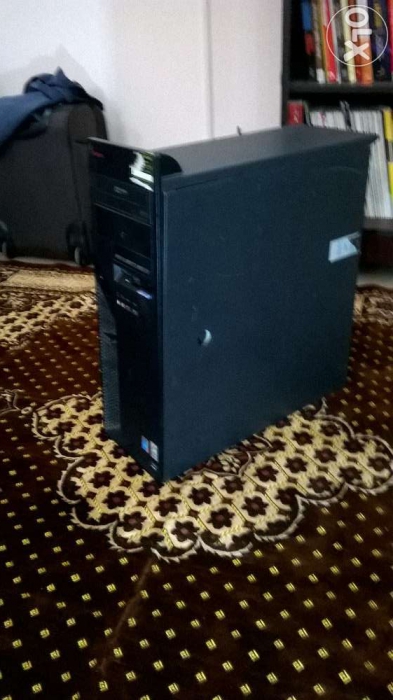
That big, black box in the above pic is our now defunct home PC. We bought it second hand as a simple, browsing machine for home use. Before it we had a custom built Pentium D unit which lasted a full 6 years.

The IBM box is so heavy it takes both hands and whole lot of effort to move it around. We even bought a Dell PC for Dad for his room at Manuguru. We jokingly referred to it as 'the generator'. The power unit on it was that loud.

All three PCs died, most recently the Dell and Dad was badly in need of a replacement so I started looking around online.

I was looking for a compact PC so considered the Intel NUC units, very customizable but the asking price was a bit too much. Zotac and Gigabyte have models too but difficult to find and VERY expensive.

I stumbled across the HP Mini 300-010in on Amazon. The price was just right. I just had to get it!


It is surprising how small this unit is...It is as big as a school lunchbox!


I installed it at Dad's desk and he is quite happy with it. The decidedly low 2 GB RAM is adequate for his browsing needs and the core i3 should more than make up for processing. I'm hoping this setup will last at least three years before requiring an upgrade.


Dad's always yearned for an L-desk, similar to the one he has at his Office. Next on list!

September 24, 2011

e-waste: salvage useful parts


The SMPS(Switched mode power supply) on my jurassic  IBM Thinkcentre gave up last month and it's been lying in a corner gathering dust. I finally got around to opening up the beast today.

Good thing about assembled PCs like these is the quality of cabinets they use. This one is built like a tank- I've never held a heavier cabinet.

Four screws removed and a little push and the SMPS smoothly slid out of the railing. I replaced it  with a Zebronics 450W unit, whose small frame looks totally out of place in the massive metal box.

I held it in place with a couple of wires as the screws wouldn't fit.


 The defunct HIPRO (Chinese IBM vendor) had a few things to donate before going to trash.


I managed to salvage the 12mm fan which I'll hopefully use on my other desktop via some tweaks.
A couple of LEDs and lots of wire with 5v rails and SATA connectors were also recovered.

No computer hardware goes completely waste. There are always things you can make us of: LEDs, fans, wires and for electronics geeks(I'm not one) there is also circuit component galore.  


e-waste is a problem that is affecting us on a global scale. Re-using  old components or donating to persons in need is one way of doing good for the society as well as nature.

The most important point to remember however, is to dispose of e-waste safely. This is one good page I found from India.

December 30, 2009

ty-PC-l problems

Computers are fascinating. And a headache too.

Call it coincidence or just plain bad luck but I seem to have the most unique hardware/software problems
everytime. Right from my first PC in school, I have faced countless totally weird problems.
I used to bug my cousins for solutions then but I'm doing it all myself now.

Most computer breakdowns occur due to software errors(Operating system crash etc) but a dead PC can also be attributed to hardware faults such as loose cables, improperly seated memory modules, heating issues or worse a dead or 'fried' motherboard.

I remember in class 9, I wiped off the thermal paste under the heatsink of my PC thinking it was grease or
something! The PC still worked fine though coz PIII was a cool runner. Doing that on a modern processor will fry it(safety mechanisms are there though). My PC was so jinxed it used to crash several times in a month. Sometimes the IDE cables died and sometimes windows crashed. I played around with it so much, I felt a little let down when Dad sold it to someone for a meagre 3k! My old too Acer gave up a little over a week ago.


             My first PC in a cardboard case with its innards spilled out!


My cousin who's in class 9 now(like I was in 2001!) brought his PC some days ago- it's not booting up. I checked for the usual culprits: cables, RAM, heatsink assembly and front panel buttons. I rewired the whole thing but still no success. I knew the fault lay in the power supply. I removed the motherboard and tried it on my cabinet and tada! it worked. I'll get a new SMPS this weekend.


the fan spins atlast!

August 27, 2009

Of obsolete goods and PITA salesmen

Ever assembled your own PC? If yes, read on. Otherwise go build a PC,it's fun. In addition to
giving insight into the various component and parts, it also allows customization according to
needs. A basic setup for internet and word processing requires not more than 2ghz of
processing power and 2gb of value RAM. Dual core or Quad core processors can be used for
gaming rigs or workstations coupled with high speed RAM modules above 4gb.


shopkeepers sometimes recommend components that are overpowered and serve no no
purpose for basic tasks. Actually that is ok considering some try to push obsolete parts that
are no longer supported by the manufacturing companies.
My friend who went to buy a Laptop at a computer shop at Secunderabad, was offered a
Laptop that was no longer in production.
I accompanied a friend once to buy PC parts. The salesman offered a processor and mobo
combo that was more than 2 years old!
I also noticed that the products displayed were more or less the same in every shop I went to.
they had the same models of mp3 players everywhere. I asked for a Creative muvo and no one
had it. But it was couple of years ago. Things have changed a now.

Some tips before you go out computer shopping:

- Do your homework: Never go out shopping without proper research. List your requirements
and find products on the internet that are rated well. Read reviews.
An ignorant customer with no computer know-how WILL be taken for a ride.
A shopkeeper once told me a I coudn't connect a monitor without a graphics card! duh! He's working at Intel now I think.
- In most cases the first product the salesman shows you is probably obsolete or has a biger
profit margin. Ignore it and ask for more. If the salesman loses interest,lose him.

- salesman again. Don't put up with arrogant salesmen, If you feel he is not very
cooperative, tell him and walk off. I've quite often seen salesmen who tend to think they own
the shop. Try out the other shops.

- Check,Recheck: Before you walk out with your goods, check them for any defects. Check
the packaging and the documentation. Don't forget to take a printed invoice. Shopkeepers
seem to lose their courtesy once you walk out.


I love shopping. who doesn't? Well, computer shopping is more fun. A little care is all that is
needed.


August 25, 2009

Bass anyone?


I was idly browsing thru indiatimes shopping portal when I came across SonicGear EVO 7 multimedia speaker system which sells for around 2.5k.
SonicGear is unknown in India but seems to have a good following in Singapore,where it is based.
Notable among it's features is a graphical display that displays color visualisations and other information.
Also the subwoofer is powered at 24 watts RMS which is way more than similar priced offerings from other brands such as Logitech,Creative and Altec Lansing.Even the satellites are rated at generous 8 watts. Although I coudn't find any reviews on the internet, the product seems to be good. The company website is neat and provides all the information on specs. I could'nt find a store locater though.
Check out these links

http://http//shopping.indiatimes.com/i/f/t/-pid-2534109-ctl-20376650-cat-960047-pc--